Most referral problems can be diagnosed from one place: the Refer a Friend Data box on the friend’s order. Start there, then follow the branch that matches what you see.
Step 1: Rule out the basics
- Program on: WooCommerce → Refer a Friend → Settings → General Settings → Disable Referral Program is off.
- One version only: the free version from WordPress.org isn’t also installed.
- Up to date: you’re on the latest Premium version. Many older issues, such as block checkout problems, are already fixed.
- Separate identities: if you’re testing yourself, read why testing with your own account fails.
Step 2: Open the friend’s order
- Go to WooCommerce → Orders and open the order the friend placed.
- Find the Refer a Friend Data box in the right-hand column.
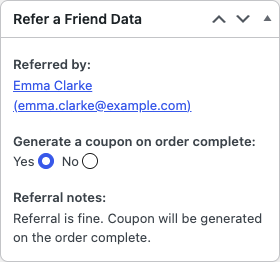
Step 3: Follow what the box says
| What the box shows | What it means | Go to |
|---|---|---|
| No referral data. | The plugin didn’t see a referral link or code when the order was placed. | Friend discount not applied, section “The referral wasn’t tracked” |
| A note starting Potential Fraud Detected | A fraud check matched an earlier order. No coupon is created. | Referrer didn’t get a coupon |
| This is not a new customer… | The friend already has completed orders. | Referrer didn’t get a coupon |
| Order minimum amount of … has not been met. | The order is below Minimum referral order. | Referrer didn’t get a coupon |
| Coupons wont be generated due to nth coupon option. | You reward every Nth referral and this wasn’t one. Working as set up. | Referrer didn’t get a coupon |
| Coupons wont be generated as advocate has been blacklisted. | The advocate’s email is on the ban list. | How fraud protection works |
| Referral is fine. Coupon will be generated on the order complete. | Tracking worked. Go to step 4. | Step 4 below |
Step 4: The referral is fine but there’s no coupon
- Check the order status. The coupon is created only when the order reaches the Generate Referral Reward On status, which is Completed by default.
- Check whether the coupon exists. Search Marketing → Coupons for the order number. Reward coupons have a description such as “Referral coupon for: … from order #1234”. You can also check WooCommerce → Refer a Friend → Event Logs for “New Coupon Generated”.
- If the coupon exists, it’s an email problem. See Emails not arriving.
- If it doesn’t exist, check that Order Based Reward is on under Settings → Advocate Reward.
Step 5: The friend didn’t get a discount
If the order is tracked but the friend paid full price, or saw an error at checkout, see:
Still stuck? Contact support
Contact us and include:
- Your plugin version, from Plugins → Installed Plugins.
- The order number and the exact text in its Refer a Friend Data box.
- What you expected, what happened, and the steps you took.
- Any log from WooCommerce → Status → Logs with the source
wpgens-raf.