Last updated
New customers get a referral code when they register. Customers who registered before you installed the plugin get theirs the first time they see a page with their referral link. To create codes for everyone at once, for example before an email campaign, use the Create referrals tool.
Create the codes
- If you want codes for customers who haven’t ordered yet, go to WooCommerce → Refer a Friend → Settings → General Settings and turn off Hide referral link for users without any orders for now.
- Go to WooCommerce → Status → Tools.
- Find Refer a friend – Create missing referral links. and click Create referrals.
- Wait for the message “… missing referral codes have been created”.
- If you have more than 1,000 customers, click Create referrals again until it says 0 codes were created.
- Turn Hide referral link for users without any orders back on, if you turned it off.
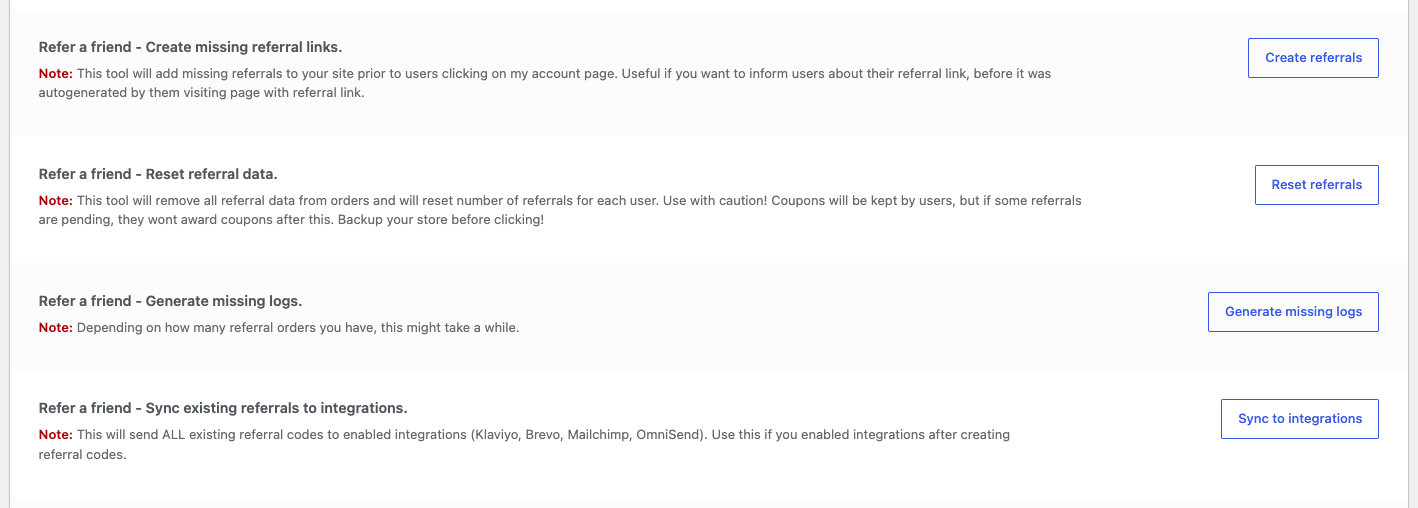
Codes are created for every user account that doesn’t have one, including admins and shop managers. Existing codes never change.
Check it worked
Go to Users, open a past customer and scroll to Refer a friend Link. It should show their link instead of “Go to Woocommerce -> System Status -> Tools…”.
Next steps
- Export the codes to a CSV: How to export referral codes.
- Send the codes to your email marketing tool, such as Klaviyo or Mailchimp. After connecting a tool, click Sync to integrations on the same Tools screen.
- Remind customers automatically after their next order: Reminder email.