Use this page when a friend arrives through a referral link or code but doesn’t get their discount, or sees the error Coupon “ref1234567” does not exist! Work through the causes in order. The first ones are the most common.
Before you start: test as the friend in a private window, with an email, address and phone that have never ordered on your store. Logged-in admins and the advocate themselves never get the friend discount.
The friend discount isn’t set up
- Go to WooCommerce → Refer a Friend → Settings → Friend Reward.
- Check that First Purchase Discount is on.
- Check that Coupon Code contains the code of a published coupon under Marketing → Coupons. It must match exactly.
If you see “does not exist” for a ref… code, the most likely cause is this: the plugin builds the referral code’s discount from the coupon in Coupon Code. If that coupon was deleted, renamed or moved to draft, every referral code stops working.
The friend coupon has a restriction
Open the coupon from Coupon Code in Marketing → Coupons and check:
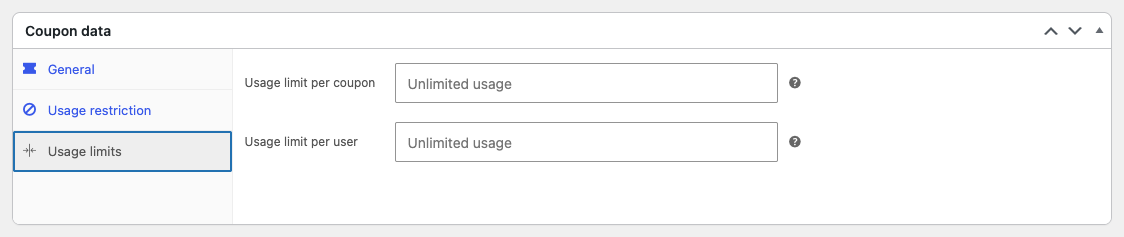
- Usage limits → Usage limit per coupon is empty. A limit of 1 means only the first friend ever gets the discount.
- Usage restriction → Allowed emails is empty.
- General → Coupon expiry date hasn’t passed.
- Usage restriction → Minimum spend isn’t higher than the cart. When the cart is too small, the plugin shows “You have a referral discount! Add … more to your cart to use it” instead of applying it.
- Products, Exclude products and the category fields don’t exclude what’s in the cart.
Referral codes are turned off
If the friend types a ref… code at checkout and sees “does not exist”, go to Settings → General Settings and turn on Enable Referral Codes. Links work without this setting. Typed codes don’t. Typed codes also need First Purchase Discount on and a valid Coupon Code. See Referral codes at checkout.
Referral codes never appear under Marketing → Coupons. That’s expected: they’re virtual coupons created at checkout.
The friend isn’t a new customer
The discount is only for first-time customers. It isn’t applied when:
- The friend is logged in and already has a completed order.
- The friend’s billing email, phone or address, or their IP address, matches an earlier order. In this case the discount is removed at checkout with a message. See Referral discount removed at checkout.
Another coupon is already in the cart
The plugin only auto-applies the friend discount to a cart with no other coupons. If the friend added a different coupon first, remove it and reload the cart. Only one referral discount can be used per order.
The friend is the advocate
A customer can’t use their own link or code. The plugin ignores it silently. This is also what happens when you test while logged in as the advocate or as an admin who shared their own link.
The advocate is banned or hidden
- The advocate’s email is in Settings → Fraud Settings → Emails to Ban.
- The advocate is a guest referrer, Hide referral link for users without any orders is on, and the advocate has no orders.
The referral wasn’t tracked
If none of the above applies, the referral cookie probably never reached checkout. The order’s Refer a Friend Data box then says No referral data.
The plugin saves the referral in a cookie named gens_raf when the friend opens a link containing ?raf=. That cookie is set by the plugin’s JavaScript on the page. Check:
- The link still has
?raf=when the page loads. Redirects fromhttptohttps, fromwwwto the bare domain, or from a landing page plugin can drop the query string. Paste the link in a private window and look at the address bar after the page loads. - JavaScript isn’t delayed or blocked. Optimization plugins that delay JavaScript until the visitor interacts, such as WP Rocket, LiteSpeed Cache or Perfmatters, can stop the cookie from being set. Exclude
gens-raf-public.jsand jQuery from delay and combine settings. - A cookie consent tool isn’t blocking it. Mark
gens_rafas a functional cookie in your consent plugin. - The friend used the same browser. The cookie lives in one browser on one device. Opening the link on a phone and buying on a laptop isn’t tracked. Referral codes typed at checkout work across devices.
- The cookie hasn’t expired. It lasts for Cookie Time days, which is 7 by default. Find it under General Settings → Show advanced options. If the field is empty, the cookie lasts only one day.
To credit the advocate for an order that wasn’t tracked, add their code to the order by hand. See Referrer didn’t get a coupon.
The discount applies but the cart message doesn’t show
In version 4.4.12, the custom Cart Message from Friend Reward may not appear even though the discount is applied. This is a known issue and doesn’t affect the discount itself.
Check it worked
Open a fresh private window, visit the advocate’s link and add a product to the cart. The cart totals should show the discount. Then follow Test your referral program to the end.