This page explains when Refer a Friend creates reward coupons, and what happens to them afterwards. Read it before you change the trigger status or promise a reward on your site.
The three rewards
| Reward | Who gets it | When | Set it up in |
|---|---|---|---|
| First Purchase Discount | Friend | Applied to the cart during their first order | Settings → Friend Reward |
| Order Based Reward | Advocate | When the friend’s order reaches the reward status | Settings → Advocate Reward |
| Post-First Purchase Coupon | Friend | When their first order reaches the reward status | Settings → Friend Reward |
The advocate can get a Registration Based Reward instead of an order based one. You can only turn on one of the two. See Advocate reward settings.
The reward status
Advocate and Post-First Purchase coupons are created when the friend’s order changes to the status in WooCommerce → Refer a Friend → Settings → General Settings → Generate Referral Reward On.
| Option | Use it when |
|---|---|
| Default (Completed) | You ship physical products and want to wait until the order is fulfilled. This is the safest choice. |
| Completed | Same as Default. |
| Processing | You sell digital products or services and orders never get marked Completed. |
| On Hold | You take manual payments, such as bank transfer, and want to reward before payment clears. Not recommended. |
| Pending Payment | Rarely useful. The order hasn’t been paid. |
The earlier the status, the more likely you’ll reward an order that’s later cancelled or refunded. Coupons aren’t removed when that happens.
Developers can also set the status with the wpgens_raf_order_status filter. The setting in the admin wins when it isn’t Default.
What happens when the order reaches the status
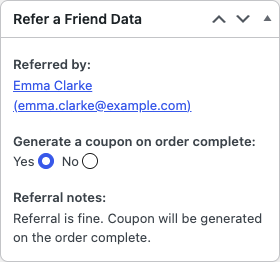
- When the friend places the order, the plugin saves the referral and runs its fraud checks. The result is shown in the order’s Refer a Friend Data box.
- When the order reaches the reward status, the plugin reads that result. If the referral passed, it creates the advocate coupon and emails it to them.
- If Post-First Purchase Coupon is on, it also creates the friend’s coupon and emails it to them.
- The advocate’s referral count goes up by one. You can see it under Advocates.
Each reward is a normal WooCommerce coupon with a code like RAF-A1B2C3D4E5. It’s limited to one use and to the email address of the person who earned it. You’ll find it under Marketing → Coupons, with the description “Referral coupon for: … from order #…”.
Things that surprise store owners
- Changing settings doesn’t change existing coupons. A new amount or expiry only applies to coupons created afterwards. Edit older coupons under Marketing → Coupons.
- Refunds and cancellations don’t remove rewards. If an order is refunded after the coupon was created, delete or edit the coupon yourself.
- An order that reaches the reward status twice creates two coupons. For example, an order marked Completed, moved back to Processing and marked Completed again. Avoid moving referral orders back and forth, or delete the extra coupon.
- Turning off emails doesn’t turn off coupons. Disable sending of emails only stops the email. The coupon is still created, and customers can see it in My Account → Refer a Friend.
- Registration rewards skip fraud checks. They’re created when the friend creates an account, before there’s an order to check. See Advocate reward settings.
- Renewal orders don’t create rewards. Only the friend’s first order counts. See WooCommerce Subscriptions.
Rewards other than coupons
If you’d rather give points or store credit, see Reward advocates with points or store credit.