Last updated
Revenue First Analytics attributes every sale to the traffic source of the buyer’s first visit, known as first touch. When an order is placed, the plugin saves the buyer’s visitor and session on the order. When the order reaches the status you choose in Settings (Completed by default), the revenue is recorded against the channel, referrer, campaign and landing page of that first visit.
How is the buyer linked to an order?
Attribution starts at checkout, on the buyer’s own request. The plugin hooks woocommerce_checkout_order_created for the classic checkout and woocommerce_store_api_checkout_update_order_meta for the block checkout. On both, it resolves who the visitor is and stores two hidden meta fields on the order: _rfa_visitor_id and _rfa_session_id.
The visitor is resolved on the server, not by the browser. If the tracking mode and the visitor’s consent allow it, the ID comes from the first-party _rfa_vid cookie. Otherwise it is the cookieless daily hash of a secret salt, your domain, the IP address and the browser’s User-Agent. That is why attribution works for cookieless visitors too, as long as the purchase happens on the same day as the visit. See How Revenue First Analytics Works for the full picture.
A session is the visitor’s most recent activity with no gap longer than 30 minutes. Because the visitor is captured once at checkout, nothing that happens later can lose the link.
When does an order count as a conversion?
An order becomes a conversion when it reaches the status set in Settings, under Integrations, in the dropdown Record conversion when order status is. The default is Completed. The list contains every WooCommerce order status on your site, including custom ones, plus one special entry.
| Option | When the conversion is recorded |
|---|---|
| Completed (default) | When the order status becomes Completed. |
| Processing | When the order status becomes Processing, usually right after a successful payment. |
| Payment Complete (hook) | When WooCommerce fires woocommerce_payment_complete, which happens when a gateway confirms payment. Offline gateways such as bank transfer never fire it. |
| Any other status | When the order reaches that status, for example a custom “Shipped” status. |
Whatever you choose, Completed always counts as a conversion as well. This covers offline gateways that never fire the payment hook and virtual or downloadable orders that skip Processing. Each order is recorded once: a _rfa_tracked flag on the order prevents double counting when it passes through both statuses.
What does first-touch attribution mean?
When the order converts, the plugin looks up the visitor’s earliest session and attributes the order to it. It stores the amount (order total minus any refunds), currency, product names, billing country and a one-way hash of the billing email, together with the first session’s channel, referrer, device, browser and operating system.
The revenue row carries the session ID of that first session, so the Channel, Referrer and Campaign tabs of the Traffic Sources card and the Entry Pages tab of the Pages card all agree with each other. A buyer who found you through a Google search, came back later from a newsletter and then bought is credited to Organic search, not Newsletter. Read Channels, Referrers and Campaigns Report for how channels are classified.
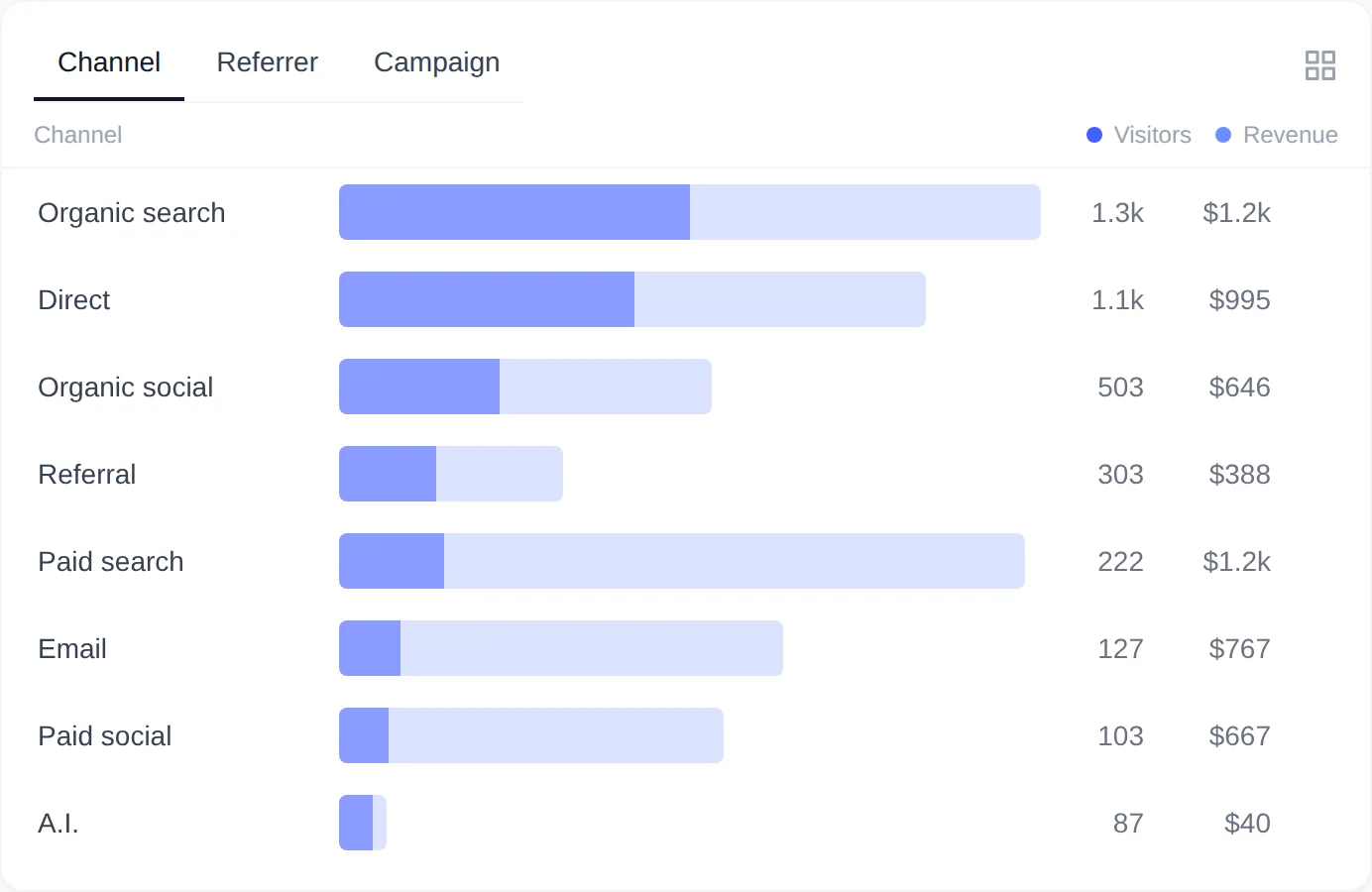
If the visitor has no earlier session (for example the cookie was set during this visit), the checkout session itself is used. If neither can be found, the order is recorded as Unattributed.
What about PayPal, Stripe and other gateways that confirm by webhook?
They attribute correctly. The visitor was saved on the order during checkout, before the buyer left for the payment page. When the gateway’s webhook later moves the order to Processing or Completed, that request carries no cookies, but the plugin reads the visitor from the order meta instead. The same applies when you change the status by hand or when the buyer never returns to the thank-you page.
Why do some orders show as “Unattributed”?
An order is Unattributed when no tracked visit could be found for the buyer. Unattributed appears as its own row in the Channel tab, with revenue and orders but no visitors. Common reasons:
- No tracked visit: the buyer’s browser blocked the tracking script, JavaScript was disabled, or the order was placed before the plugin was installed.
- Orders created in the admin (phone orders, manual invoices): no visitor is captured because the request is yours, not the buyer’s.
- Visit older than the same-day window: in Privacy mode, or in Consent mode before the visitor consents, the visitor ID changes every day. A purchase on a later day cannot be linked to the earlier visit.
- Checkout on another domain: if the order is placed on a domain where the tracker does not run, there is no visit to match.
There is one fallback. If an order has no captured visitor but the same billing email bought before with a tracked visit, the new order is linked to that earlier visitor and inherits its first-touch attribution. This fallback is skipped in Privacy mode, which never links activity across days.
Why are sales only attributed within the same day in Privacy mode?
The daily visitor ID
Privacy mode stores nothing on the visitor’s device. Visitors are counted with a hash that includes a secret salt replaced every day (UTC), so the same person gets an unrelated ID tomorrow. A session that crosses midnight keeps its ID, but a visit on Monday and a purchase on Thursday cannot be joined.
Consent mode before consent
Consent mode works the same way until the visitor accepts statistics cookies. After consent, the _rfa_vid cookie allows attribution across days and weeks, and the current anonymous session is moved to the new ID so the landing page and source are kept. If no banner is connected, the dashboard shows the notice “No consent banner detected: sales are only attributed within the same day”. See Choosing a Privacy Mode and Connecting Your Cookie Banner.
Where can I see the attribution for an order?
The plugin does not add a meta box or a column to the WooCommerce order screens. The attribution data is stored as hidden order meta (_rfa_visitor_id, _rfa_session_id, _rfa_tracked and _rfa_revenue_id) and shown in the dashboard instead:
- The Converted tab of the Conversions card lists converted visitors with their channel and source. Click one to open the visitor timeline.
- The breakdown cards show revenue and orders per channel, referrer, campaign, entry page, country, browser, OS and device.
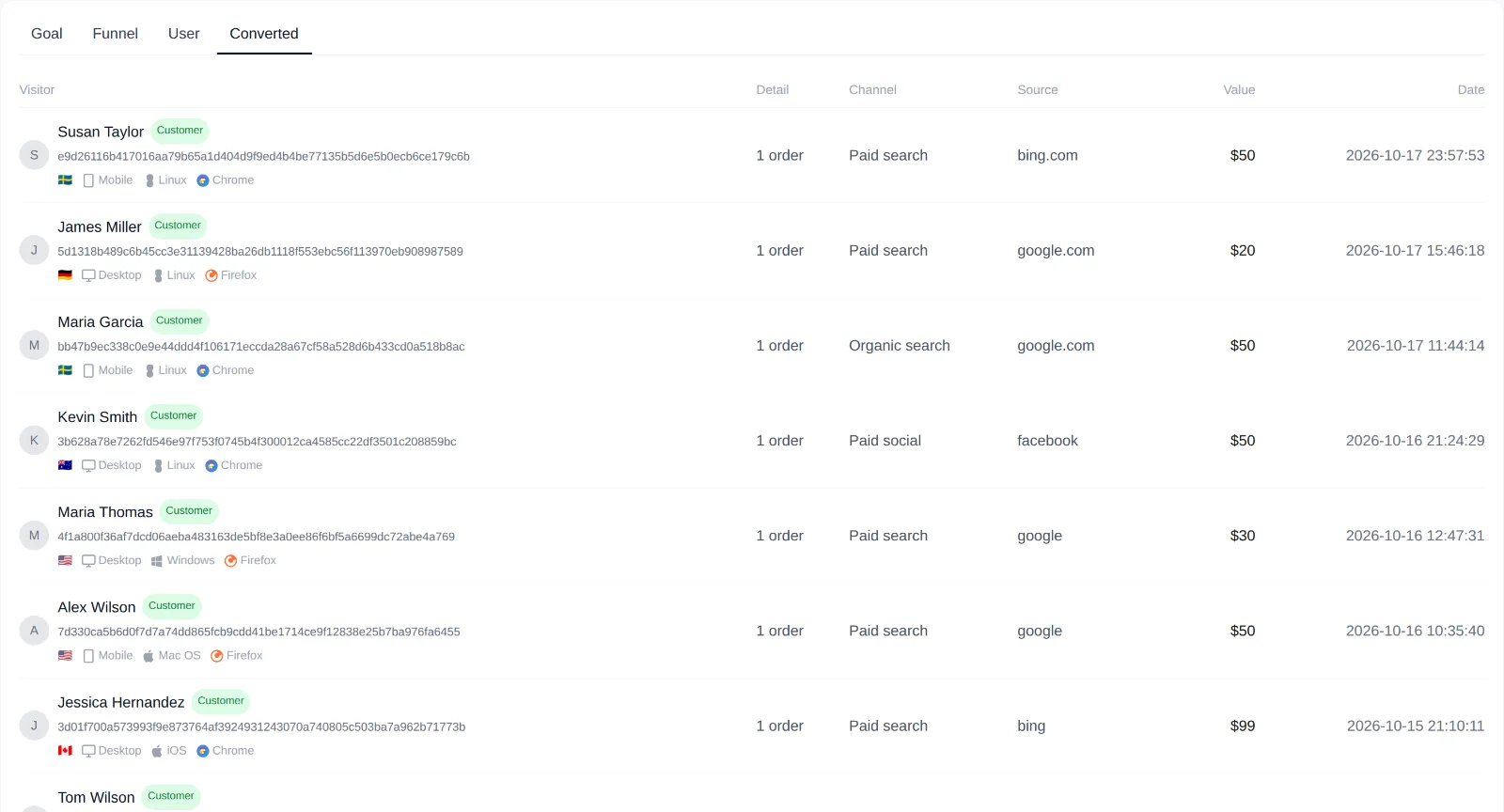
How the recorded revenue changes after the sale is covered in Refunds, Cancellations and Subscription Renewals.
How is this different from WooCommerce’s built-in Order Attribution?
WooCommerce 8.5 and newer has its own Order Attribution feature. It stores the origin of each order, such as the source type, UTM values and device, and shows it on that order’s edit screen. That answers “where did this one order come from?”. It does not count visitors, so it cannot show conversion rates, and it does not report revenue per channel, campaign or landing page over a date range.
Revenue First Analytics tracks the visits as well as the orders, so it reports both sides in one place: how many people each channel, campaign and landing page brought, how many of them bought, and how much revenue they produced. The two features work independently and can stay active together.