Last updated
The Traffic Sources card in Revenue First Analytics has three tabs. Channel groups visitors into Direct, Organic search, Organic social, Paid search, Paid social, Email, Newsletter, Affiliate, A.I. and Referral, based on the referrer and UTM parameters of the first pageview in a session. Referrer lists the sites that sent them, and Campaign breaks visitors down by UTM parameter. Each row shows visitors, revenue, orders and conversion rate.
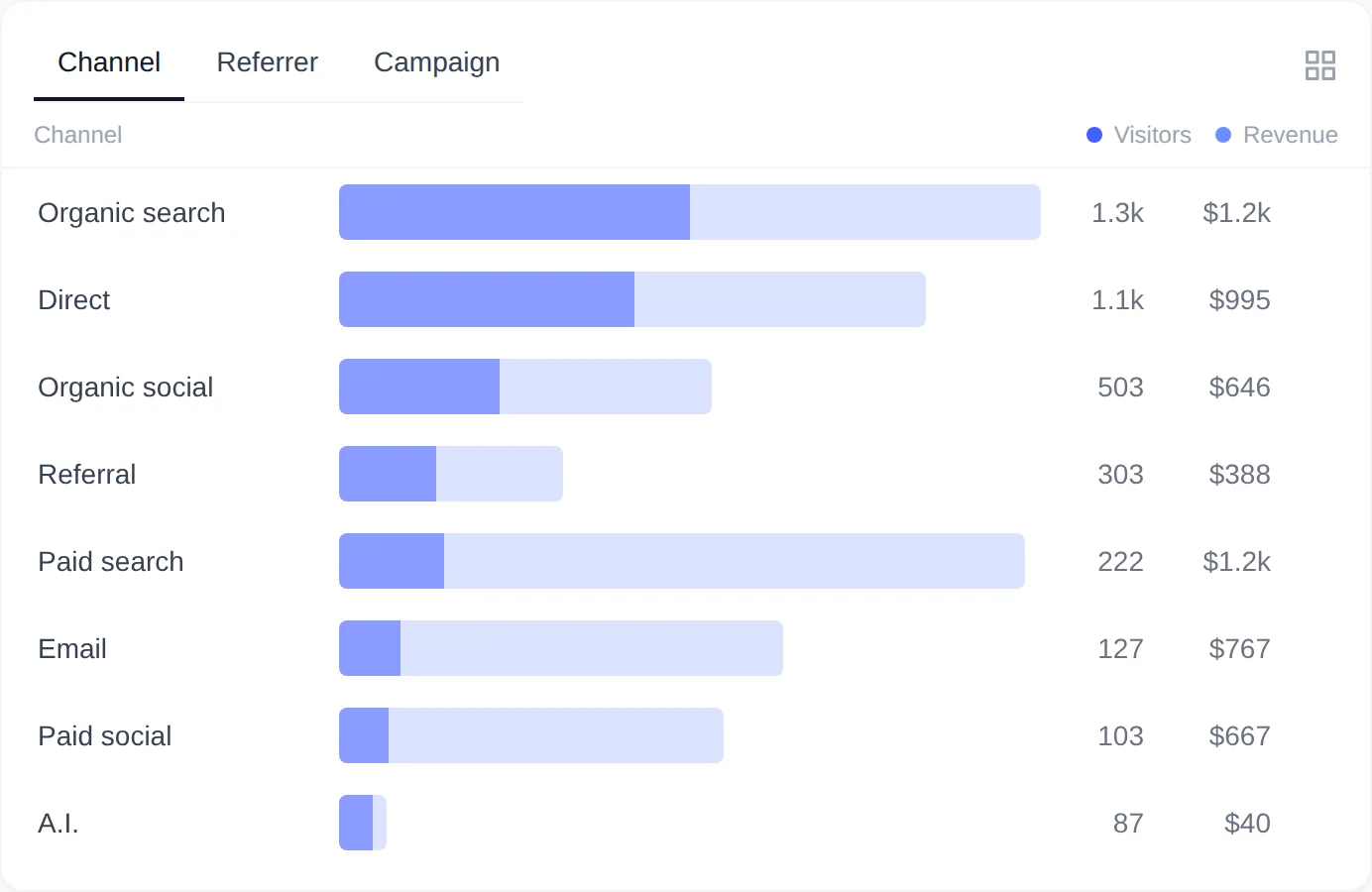
How are channels classified?
A channel is the type of traffic source. It is decided once per session, from the referring page and the URL parameters of the session’s first pageview, and it never changes afterwards. The rules run in this order and the first match wins. UTM values are compared in lowercase.
utm_mediumiscpc,ppc,paid-searchorpaidsearch: Paid search.utm_mediumispaid-social,paidsocial,paid_social,social-adorsocialad: Paid social.utm_mediumorutm_sourceisaffiliate: Affiliate.utm_mediumisemail: Email.utm_mediumisnewsletter: Newsletter.- The URL carries a
gclid(Google Ads) ormsclkid(Microsoft Ads) click ID: Paid search. - The referrer is chatgpt.com, chat.openai.com, perplexity.ai, claude.ai, gemini.google.com or copilot.microsoft.com: A.I.
- The referrer is a search engine: google, bing, duckduckgo, yahoo, baidu, yandex, ecosia, qwant, startpage or search.brave.com, on any country domain or subdomain: Organic search.
- The referrer is twitter.com, x.com, t.co, facebook, fb.com, instagram, linkedin, lnkd.in, youtube, tiktok, reddit, pinterest, threads.net, mastodon.social or bsky.app: Organic social.
- Any other referring site, or no referrer but a
utm_sourcein the URL: Referral. - No referrer and no UTM parameters: Direct.
Pages on your own domain are never treated as a referrer, so moving between your own pages does not start a Referral session. One more value can appear in the Channel tab: Unattributed, for orders whose buyer had no tracked visit at all (tracking script blocked, or the order was placed before the plugin was installed). Unattributed always shows zero visitors.
What do the columns mean?
Each row shows Visitors and Revenue. Hover a row for Orders, Revenue/visitor, Conversion rate and Visitor share, or open View details (the grid icon) for a sortable table with Orders, CR% and Rev/vis columns.
| Column | Meaning |
|---|---|
| Visitors | Different visitors with at least one session from this channel, referrer or campaign value in the date range. |
| Revenue | Conversions recorded in the range that are attributed to this row by first touch, after refunds. |
| Orders | Number of those conversions. |
| Conversion rate (CR%) | Orders divided by Visitors. |
| Revenue/visitor (Rev/vis) | Revenue divided by Visitors. |
| Visitor share | This row’s visitors as a share of the visitors in the rows shown. |
First touch means the channel, referrer and landing page of the buyer’s first known visit. When an order reaches the conversion status, the plugin saves that first session’s channel and referrer with the order, and the Channel tab reads the revenue from there. A channel can therefore show revenue with few or zero visitors in the range when the first visit happened before the range started. Details are in How Sales Are Attributed to Traffic Sources.
What does the Referrer tab show?
The Referrer tab lists the hostname of the page that linked to you, in lowercase, exactly as the browser reported it. Subdomains are separate rows, so m.facebook.com, l.facebook.com and www.facebook.com each get their own line. Direct visits have no referrer and do not appear here.
Only the scheme, host and path of the referring URL are stored. The query string and the fragment are stripped before anything is saved, because they can carry search terms, tokens or other personal data. Referrers that are not http or https URLs are discarded.
Which UTM parameters are captured?
The tracking script reads these parameters from the address of the first pageview of each page load. They are stored with that pageview and used for the Campaign tab and the channel rules.
| Parameter | Stored | Used for |
|---|---|---|
utm_source | Yes | Campaign tab (Source), Affiliate and Referral rules |
utm_medium | Yes | Campaign tab (Medium), Paid search, Paid social, Affiliate, Email and Newsletter rules |
utm_campaign | Yes | Campaign tab (Campaign) |
utm_term | Yes | Campaign tab (Term) |
utm_content | Yes | Campaign tab (Content) |
source, ref, via | As utm_source | Short-link aliases of utm_source, used only when utm_source is absent |
gclid | No | Paid search rule only |
msclkid | No | Paid search rule only |
Values are stored as written in the link. The channel rules ignore case, but the Campaign tab does not, so Newsletter and newsletter become two rows. Keep your tags lowercase and consistent.
Tag links so campaigns show up
Add the parameters to the links you share. A paid Instagram ad for a sale could look like this:
https://example.com/sale/?utm_source=instagram&utm_medium=paid-social&utm_campaign=spring_salePick utm_medium from the values in the channel rules above so the visit lands in the right channel: cpc for search ads, paid-social for social ads, email or newsletter for mailings, affiliate for partners. Email clients and mobile apps usually send no referrer, so without a medium those clicks are classified as Referral (with a source) or Direct (without one).
How do you read the Campaign tab?
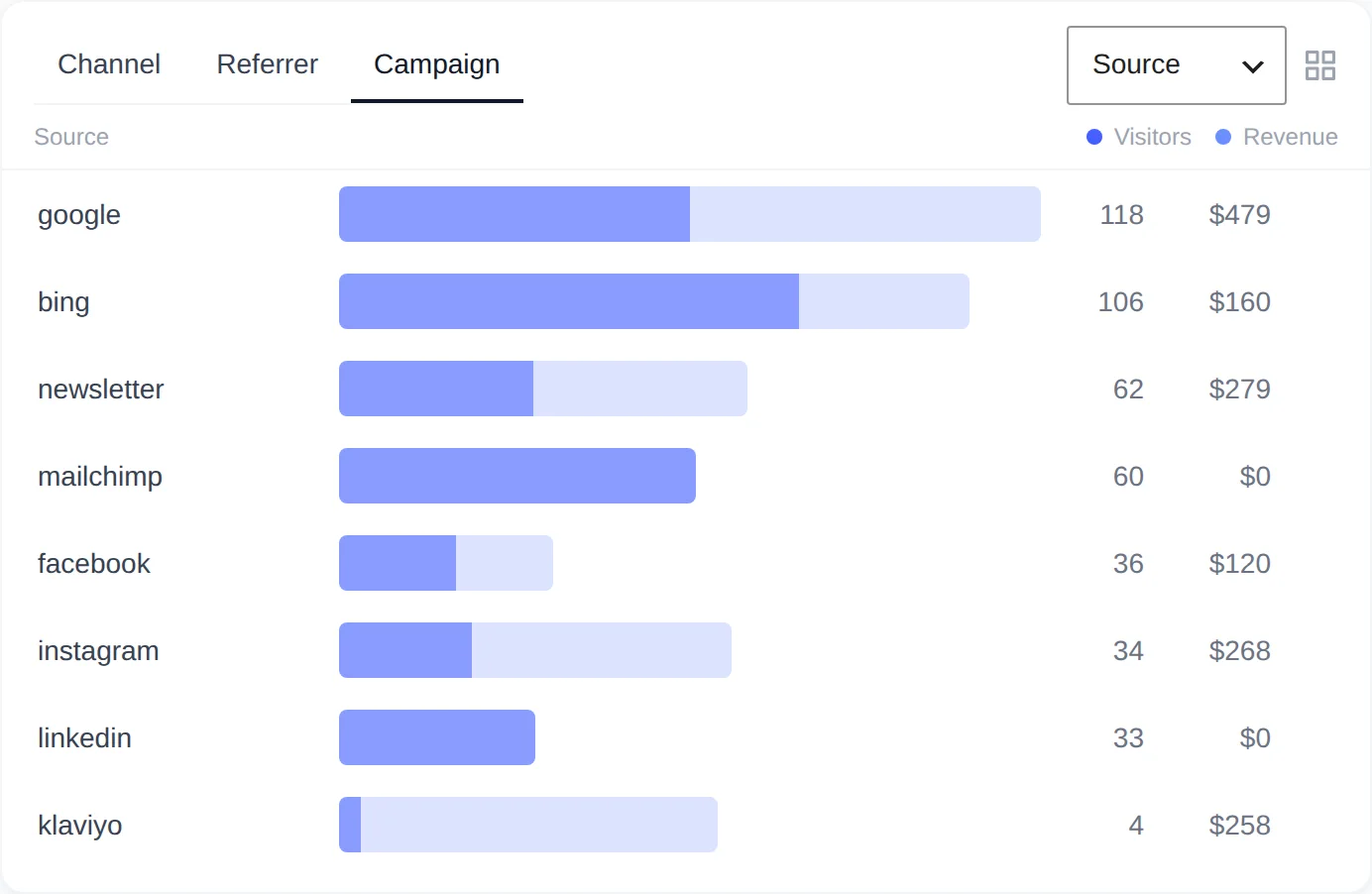
The dropdown at the top right of the tab switches between Source, Medium, Campaign, Term and Content. A row is one value of the selected parameter. Visitors are those with at least one pageview carrying that value in the range; Revenue and Orders are the conversions whose attributed first session included such a pageview. Pageviews without the parameter are not listed.
Clicking a row filters the whole dashboard by that value, for example Campaign: spring_sale, so the tiles show the campaign’s visitors, revenue and conversion rate, and the other cards show which pages, countries and devices those visitors used. See Filtering Reports by Channel, Page, Country or Device.
Why is most traffic showing as Direct?
A session is Direct when the browser sent no referrer and the address carried no UTM parameters. Links in email clients, messaging apps and native mobile apps often arrive like that, and some redirects drop the referrer on the way. Tag those links with UTM parameters. If almost everything is Direct, including clicks from Google, work through Troubleshooting: No Data, Everything Direct or Missing Orders.
Remember that the channel belongs to the first visit. In Privacy mode the plugin cannot recognize a visitor on a later day, so a purchase made the day after an ad click is attributed to the return visit (often Direct) or shows as Unattributed. See Choosing a Privacy Mode.