Last updated
Revenue First Analytics has three tracking modes. Privacy mode stores nothing on the visitor’s device and attributes sales on the day of the visit. Consent mode works the same until the visitor accepts statistics cookies, then sets a first-party cookie that allows attribution across days. Full tracking sets that cookie for everyone. Consent mode is the default and we recommend it for EU, UK and EEA audiences.
You choose the mode in Rev Analytics > Settings, in the Privacy & GDPR card.
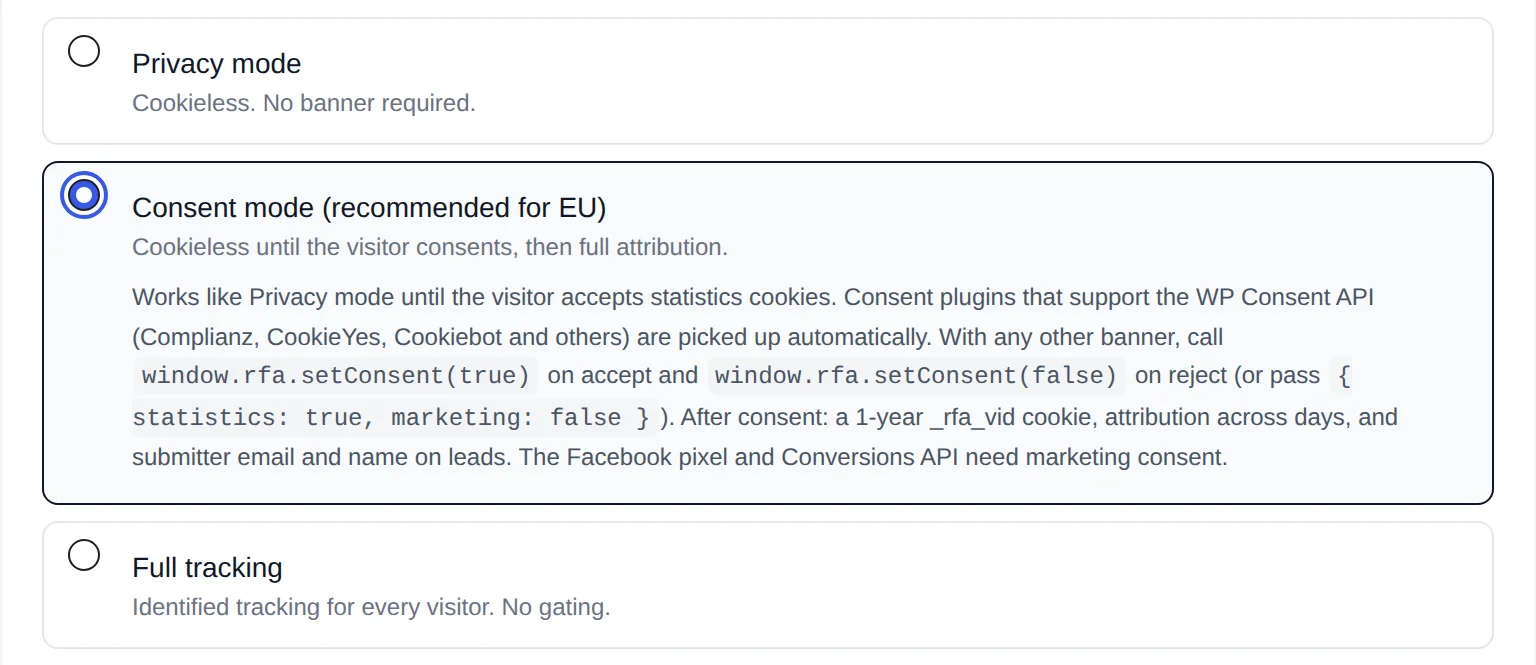
How does each mode work?
Privacy mode
Nothing is stored on the visitor’s device: no cookies, no local storage. Visitors are counted with a hash that changes every day (explained below), so a returning visitor counts as a new visitor each day. Purchases and form submissions are attributed to the visit only when they happen on the same day. The submitter’s name and email are not stored with form submissions, IP addresses are truncated before the country lookup, and the Facebook Pixel and Conversions API are off.
Consent mode (recommended for EU)
Identical to Privacy mode until the visitor accepts statistics cookies. Consent plugins that support the WP Consent API (Complianz, CookieYes, Cookiebot and others) are picked up automatically. With any other banner, call window.rfa.setConsent(true) on accept and window.rfa.setConsent(false) on reject, or pass categories: window.rfa.setConsent({ statistics: true, marketing: false }). Setup is covered in Connecting Your Cookie Banner with the WP Consent API.
After statistics consent the tracker sets a random, first-party _rfa_vid cookie for one year and sends an identify call that moves the visitor’s current anonymous session to the new ID, so the landing page and traffic source of that very visit stay attributed. From then on purchases can be attributed to visits from days or weeks earlier, and the submitter’s name and email are kept with form submissions. Marketing consent additionally enables the Facebook Pixel and Conversions API. If the visitor withdraws consent, the cookie is removed on the next page load.
If no consent plugin is connected and no visitor has consented in the last 30 days, the dashboard shows the notice No consent banner detected: sales are only attributed within the same day. Until you connect a banner, Consent mode behaves exactly like Privacy mode.
Full tracking
Every visitor gets the one-year _rfa_vid cookie with no gating: attribution across days, name and email on leads, and the Facebook Pixel and Conversions API run for everyone (when enabled). Use it only when your audience is outside the EU or consent is handled entirely outside the plugin, for example by a banner that blocks the tracking script until the visitor accepts.
How does the daily rotating hash work?
Anonymous visitors (Privacy mode, or Consent mode before consent) are identified on the server with an HMAC-SHA256 hash of your site domain, the visitor’s IP address and the browser’s User-Agent string, keyed with a secret salt. The salt is a random value generated for each UTC day and stored in your database; the first 20 characters of the hash become the visitor ID. The IP address itself is never stored.
When a new day starts, the plugin creates a new salt and deletes every salt older than yesterday. Yesterday’s salt is kept for one more day only so that a session that crosses midnight UTC keeps its ID. Because old salts are gone, old hashes cannot be recomputed by anyone, including you, and the same person gets an unrelated ID the next day.
What does each mode store and allow?
| Privacy mode | Consent mode | Full tracking | |
|---|---|---|---|
| Cookies | None | None until statistics consent, then _rfa_vid (1 year). _rfa_consent (1 year) when your own banner calls window.rfa.setConsent(). | _rfa_vid (1 year) for every visitor |
| Visitor ID | Daily hash | Daily hash until consent, then the cookie value | Cookie value |
| Sales and leads attributed to a visit | Same day only | Same day only until consent, then across days | Across days |
| Submitter name and email on form submissions | Not stored | Stored after statistics consent | Stored |
| Facebook Pixel and Conversions API | Off (the toggle explains it is not available) | Only for visitors with marketing consent | For every visitor |
| Order without a tracked visit | Unattributed | Linked to an earlier purchase with the same email, if one exists | Linked to an earlier purchase with the same email, if one exists |
| Country lookup | IP truncated to /24 (IPv4) or /48 (IPv6) first | Truncated for anonymous visitors, full IP for identified visitors; never stored | Full IP; never stored |
Every mode stores the same visit data: pages, referrer, UTM parameters, country, browser, OS, device type, time on page and scroll depth. The full list is in Cookies, Data Stored and Data Retention.
Which mode should you pick?
| Your situation | Pick |
|---|---|
| Visitors from the EU, UK or EEA and you have (or will install) a cookie banner | Consent mode |
| Visitors from the EU, UK or EEA, no banner, and same-day attribution is enough | Privacy mode |
| You want to use the Facebook Conversions API | Consent mode (needs marketing consent) or Full tracking |
| You need the submitter’s name and email on leads | Consent mode or Full tracking |
| Audience outside the EU, or your banner already blocks the script until accept | Full tracking |
This is not legal advice; check with your own advisor.
Change the mode and what happens to existing data
- Open Rev Analytics and click the gear icon to open Settings.
- In the Privacy & GDPR card, select the mode.
- Click Save changes. The new mode applies from the next page load.
Switching never deletes or converts existing data. Reports keep every pageview, session, event and revenue row that was recorded before, under the IDs they were recorded with. What changes is how visitors are identified from now on:
- To Privacy mode: on the next page load the tracker deletes the
_rfa_vidand_rfa_consentcookies. The visitor becomes a new daily-hash visitor; their old history stays under the old ID and future purchases are no longer linked to it. Facebook events stop. Names and emails already stored on leads remain until data retention removes them or you erase them through a data subject request. - From Privacy mode to Consent mode or Full tracking: visitors receive a cookie (after consent, or immediately) and the current session is linked to the new ID. Earlier days cannot be joined, because those hashes can no longer be computed.
- Between Consent mode and Full tracking: visitors who already have the cookie keep their ID. In Full tracking, anonymous visitors get a cookie on their next page load. Going back to Consent mode, visitors without statistics consent lose the cookie on their next page load.
Related: How Sales Are Attributed to Traffic Sources, Tracking Form Submissions and Leads and Facebook Conversions API and Pixel for WooCommerce.