Last updated
Revenue First Analytics is self-hosted analytics for WordPress and WooCommerce. A small script on your pages sends pageviews and events to a REST endpoint on your own site, the server works out which visitor and session each hit belongs to, and everything lands in six tables in your WordPress database. Orders are tied to the buyer’s first visit, so reports show revenue by channel, referrer, campaign and landing page.
What do visitor, session, pageview, event and conversion mean?
- Visitor: one person, represented by a visitor ID. Anonymous visitors get a hash that changes every day; visitors who accepted statistics cookies (or every visitor in Full tracking) get the random value of the first-party
_rfa_vidcookie. Which one applies depends on the privacy mode. - Session: a run of activity by one visitor with no gap longer than 30 minutes. A session records the entry and exit page, referrer, channel, pageviews, duration and bounce.
- Pageview: one page load (or in-page navigation in a JavaScript app). It stores the path and referrer (both without query string), UTM parameters, screen width, visible time and scroll depth.
- Event: a named action with up to ten data fields. The browser sends
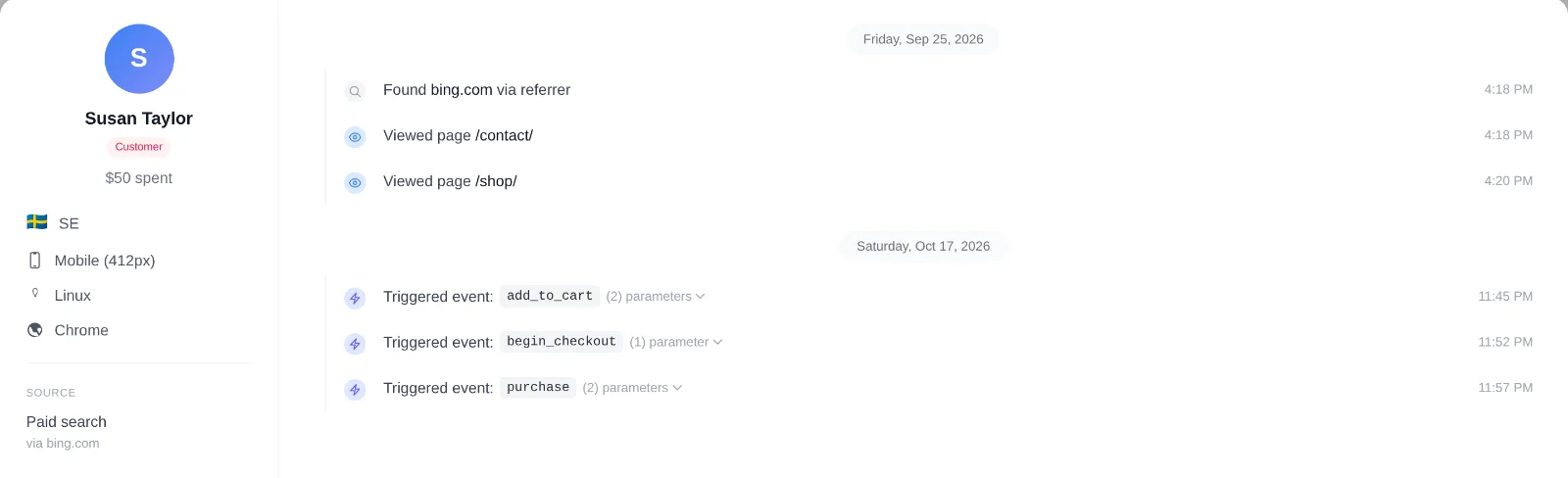
window.rfa()calls,data-rfa-goalclicks, scroll depth and scroll goal events, and product, category and tag views on WooCommerce pages. The server recordsadd_to_cart,begin_checkout,purchase,form_submitandrefunditself and refuses those names from the browser, so nobody can forge a sale or a lead. - Conversion: a WooCommerce order or an Easy Digital Downloads payment recorded in the revenue table. Form submissions are tracked as
form_submitevents and shown as leads. Goals and funnels are built on top of events and pageviews. - Channel: the traffic category assigned to a session from its referrer and UTM parameters (Organic search, Paid search, Organic social, Referral, Direct and others). See Channels, Referrers and Campaigns Report.
How does the tracking script collect data?
On every front-end page the plugin loads tracking/tracker.js with the async and defer attributes, so it never blocks rendering. The script tag carries the collect endpoint (/wp-json/rfa/v1/collect), your domain and the tracking mode. It is not loaded when tracking is disabled or an excluded administrator is logged in.
The script sends four kinds of payload with navigator.sendBeacon (falling back to fetch):
- pageview on load: path, referrer (same-site referrers are dropped), UTM parameters, screen width, plus any product, category or tag view detected on the page.
- duration when the tab is hidden or the page is left: the visible time so far (background time does not count; capped at 30 minutes) and the maximum scroll depth.
- event for custom events, goal clicks and scroll goals.
- identify once, right after a visitor gives consent, so the current anonymous session is linked to the new cookie ID.
Payloads carry no visitor or session identifier. The server reads the _rfa_vid cookie when the mode and consent allow it, otherwise computes the daily hash, and then finds or creates the session. The endpoint rejects payloads whose domain does not match your site, and drops requests from known bots and crawlers when Exclude bots is on. It also pushes page and e-commerce events to window.dataLayer for Google Tag Manager.
Where is the data stored?
Everything stays in your WordPress database. Activation creates these tables (shown with the default wp_ prefix):
| Table | Contents |
|---|---|
wp_rfa_pageviews | Visitor and session IDs, path, referrer, UTM parameters, country, browser, OS, device, screen width, time on page, scroll depth. |
wp_rfa_sessions | Entry and exit page, referrer, channel, pageview count, duration, bounce flag, country, browser, OS, device, start and end time. |
wp_rfa_events | Browser and server events with their name, data and page path. |
wp_rfa_revenue | Amount, currency, product names, the customer’s name and hashed email, billing country, attributed session, channel, referrer and time to purchase. |
wp_rfa_goals | Your goal definitions. |
wp_rfa_funnels | Your funnel definitions and their steps. |
WooCommerce and Easy Digital Downloads orders also carry meta fields that link the order to its visit, and settings are stored as wpgens_rfa_* options. The full list of fields, cookies and retention rules is in Cookies, Data Stored and Data Retention.
How does revenue get attached to a visit?
When a customer checks out, the plugin resolves their visitor and session on that same request and saves both on the order. This happens before any off-site payment, so gateways that confirm later through a webhook (PayPal, Stripe) are attributed correctly. When the order reaches the status you chose in Settings (Completed by default), one row is written to the revenue table.
That row is attributed on a first touch basis: the credit goes to the visitor’s earliest recorded session, not the one in which they bought. The row copies that session’s channel, referrer and landing page and records the time from first visit to purchase. Orders without a tracked visit (tracker blocked, or order placed before activation) are shown as Unattributed. Refunds reduce the amount, cancellations and deleted orders remove the row, and WooCommerce Subscriptions renewals are not counted as new conversions. Details in How Sales Are Attributed to Traffic Sources and Refunds, Cancellations and Subscription Renewals.
How far back the first visit can be depends on the visitor ID: an anonymous visitor gets a new ID every day, so only a same-day visit can be found, while a visitor with the _rfa_vid cookie keeps the same ID for a year.
What runs every day?
One scheduled job runs daily at 03:00 UTC through WP-Cron. It applies the Data retention setting (365 days by default): pageviews, sessions and events older than that are deleted, and revenue rows older than that keep their amount and attribution but lose the customer’s name and email hash. Setting retention to 0 disables the job.
There is no aggregation step: reports are calculated from the raw tables when you open the dashboard, so new visits show up immediately and deleted raw data disappears from traffic reports.
What is never collected?
- IP addresses are never stored. They are used in memory for the daily hash and the country lookup; for anonymous visitors the address is truncated first.
- No fingerprinting. Browser, operating system and device type are read from the User-Agent header only.
- No cross-site tracking and no third-party cookies.
- Query strings are stripped from both the page URL and the referrer, because they can carry personal data.
- Form contents are not stored. A form submission keeps the form name, and the submitter’s name and email only for identified visitors. Messages, phone numbers, uploads and other fields are never saved.
- Customer emails on orders are stored as a one-way hash, used only to find a customer’s data for access and erasure requests.