Last updated
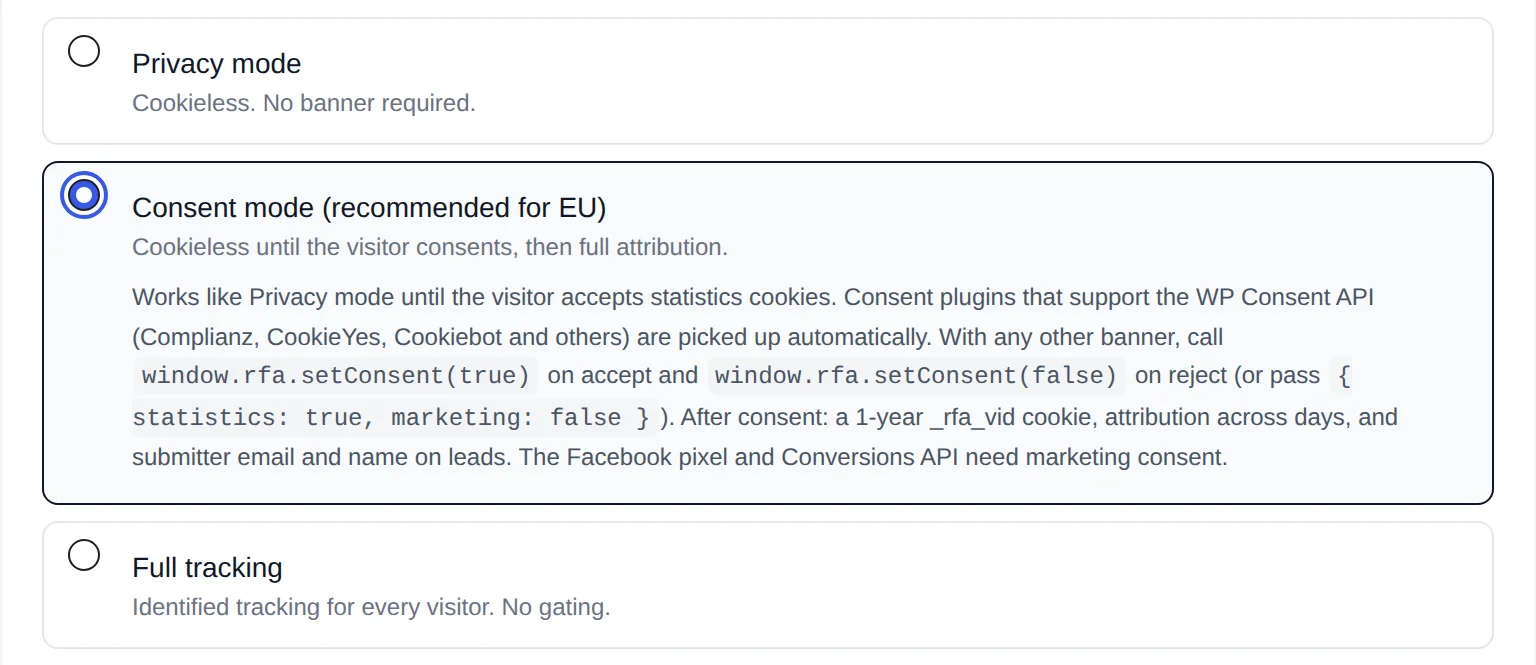
In Consent mode, Revenue First Analytics tracks every visitor without cookies until they accept statistics cookies, then sets the _rfa_vid cookie and attributes sales across days. Banners that support the WP Consent API (Complianz, CookieYes, Cookiebot and others) are picked up automatically. Any other banner connects with one call: window.rfa.setConsent(true) on accept and window.rfa.setConsent(false) on reject.
Consent mode is the default tracking mode and the recommended one for sites with visitors from the EU, UK or EEA. If you are not sure it is the right mode for you, read Choosing a Privacy Mode first. Everything on this page applies to Consent mode only: Privacy mode never uses consent, and Full tracking never asks for it.
What changes before and after consent?
Before consent, Consent mode behaves exactly like Privacy mode. The visitor is counted with a hash that changes every day, nothing is stored in their browser, and an order is linked to its traffic source only when it happens on the same day as the visit. After consent, the plugin can recognize the visitor on later days.
| Behavior | Before consent | After statistics consent | After marketing consent |
|---|---|---|---|
| Visitor ID | Daily rotating hash, nothing on the device | Random _rfa_vid cookie, 1 year | No change |
| Sales attribution | Same day only; later purchases show as Unattributed | Across days and weeks, to the first visit | No change |
| Form submissions | Form name and page only | Submitter’s name and email are also kept | No change |
| Location | Country only, from a truncated IP | Country, region and city | No change |
| Facebook Pixel and Conversions API | Off | Off | On, if enabled in Settings |
The moment statistics consent arrives, the tracker also sends an identify hit. The server moves the visitor’s current anonymous session, with its landing page and traffic source, over to the new cookie ID, so the visit that brought them is not lost. For the full list of what is stored, see Cookies, Data Stored and Data Retention.
Which consent categories does the plugin use?
- Statistics enables the
_rfa_vidcookie and attribution across days. The plugin registers_rfa_vidin the WP Consent API cookie registry under the statistics category, with a one-year lifetime and the description “Recognises a returning visitor so sales can be attributed to the original traffic source.” - Marketing enables the Facebook Pixel and Conversions API. Without marketing consent nothing is sent to Meta, even when the integration is turned on.
- Functional is the category the plugin declares for its own
_rfa_consentcookie (“Stores the visitor’s analytics consent choice.”). It only exists when you use the manual integration below.
Automatic integration through the WP Consent API
The WP Consent API is a shared WordPress standard that lets consent plugins and other plugins talk to each other. Revenue First Analytics declares itself compatible with it, describes its cookies to the registry, and loads its tracker after the WP Consent API script. If your consent plugin supports the API, there is nothing to configure: statistics consent enables the cookie and cross-day attribution, marketing consent enables the Facebook integration.
Plugins named in the plugin’s own documentation are Complianz, CookieYes and Cookiebot; any other plugin that implements the API works the same way. Check your consent plugin’s documentation to confirm its WP Consent API support is switched on.
Under the hood, the tracker calls wp_has_consent() for the statistics and marketing categories and listens for the wp_listen_for_consent_change event, so a change takes effect without a page reload. The server checks the same API before it reads the _rfa_vid cookie, and trusts it only when a consent plugin has actually set a consent type.
Why does the dashboard say “No consent banner detected”?
In Consent mode the dashboard shows an amber notice titled No consent banner detected: sales are only attributed within the same day when both of these are true: no consent plugin has registered a consent type through the WP Consent API, and no visitor has been seen with statistics consent in the last 30 days. On a fresh site the notice appears right away and disappears once the first visitor consents.
The notice explains that every visit, sale and form submission is still counted, but that purchases made days after an ad click show as “Unattributed”. It offers two buttons: Privacy settings opens the Settings screen, and Dismiss hides the notice permanently. If your audience is outside the EU, switching to Full tracking is the alternative it suggests.
Connect any other banner with window.rfa.setConsent()
If your banner does not support the WP Consent API, call window.rfa.setConsent() from the banner’s accept and reject callbacks. The call does three things: it writes the _rfa_consent cookie (value s, m or sm, 1 year), it creates or removes _rfa_vid, and it loads or pauses the Facebook Pixel when marketing is involved. In Privacy mode and Full tracking the call is ignored.
// The visitor accepted statistics and marketing.
window.rfa.setConsent(true);

// The visitor declined, or withdrew consent later.
window.rfa.setConsent(false);

// Per category: analytics yes, Facebook no.
window.rfa.setConsent({ statistics: true, marketing: false });
Put the call in the callback your banner runs when the visitor chooses, for example:
myBanner.onAccept(function (choice) {
  window.rfa.setConsent({
    statistics: choice.analytics,
    marketing: choice.advertising
  });
});

myBanner.onReject(function () {
  window.rfa.setConsent(false);
});
You do not need to call it again on every page. The _rfa_consent cookie keeps the choice for a year, and the tracker reads it on every page load. Banners that reload the page after “Accept” also work: the tracker notices the new cookie on the next load and links the anonymous session before recording the next pageview.
How does withdrawing consent work?
Call window.rfa.setConsent(false) (or let the WP Consent API report the change). The tracker deletes _rfa_consent and _rfa_vid, tells an already loaded Facebook Pixel to stop sending with fbq('consent', 'revoke'), and from the next hit the visitor is counted with the daily hash again. Data recorded while consent was active is not deleted automatically. If the visitor also asks for erasure, use the tools in Handling GDPR Access and Erasure Requests.
How do I test that consent is working?
- In Settings, open the Developer Tools card and turn on Debug mode. The debug panel is only loaded for logged-in administrators, so visitors never see it.
- Open your site’s frontend in the same browser. The panel appears in the bottom-right corner.
- Switch to the Session Info tab. It shows
identifiedandmarketing_consentas true or false, a note (“Anonymous: counted server-side with a daily hash” or “Identified: visits are linked across days by the _rfa_vid cookie”) and every_rfa_cookie currently set. - Accept your banner and watch the tab:
identifiedshould flip to true and_rfa_vidshould appear. Reject or withdraw and both should go away.
You can also type window.rfa.hasConsent('statistics') in the browser console on any page. With Exclude admin users on, the tracker runs in a debug-only mode for you, so nothing you do is recorded in the reports. If attribution still looks wrong after consent works, see Troubleshooting: No Data, Everything Direct or Missing Orders.