Revenue First Analytics for WordPress & WooCommerce

WooCommerce analytics that shows which traffic brings revenue

Self-hosted, privacy-first WooCommerce analytics that puts sales before pageviews. Every WooCommerce order is attributed to the channel, campaign and landing page that brought the buyer, and all data stays in your own WordPress database.

  • Revenue by channel, campaign, landing page and country
  • Funnels and goals show where shoppers drop off
  • Cookieless privacy mode, no banner required
  • Works with WooCommerce and Easy Digital Downloads
  • Ask Claude about your sales through MCP
  • Direct developer support

14-day money-back guarantee, no questions asked

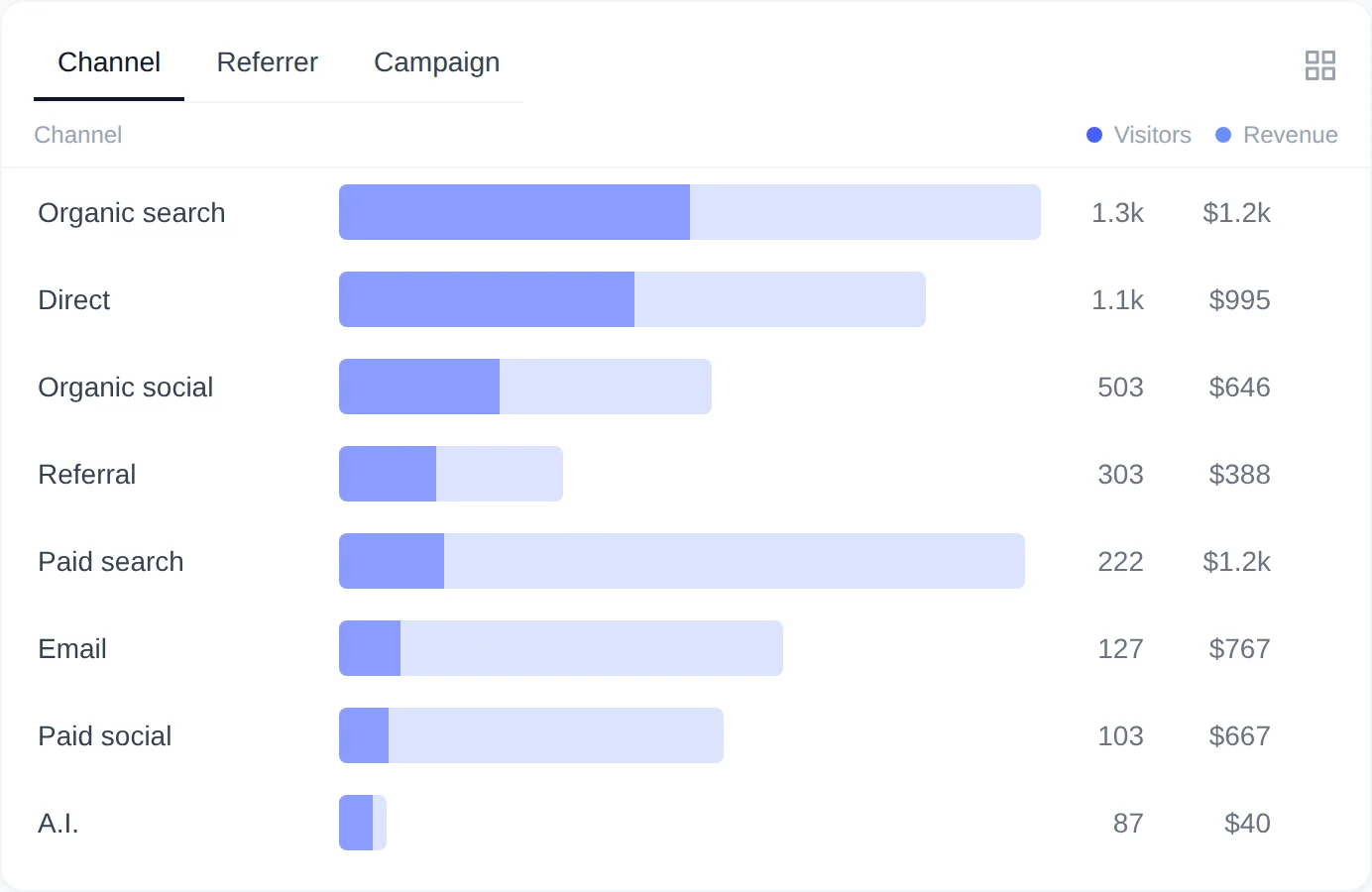
Revenue per marketing channel: organic search, direct, paid search, paid social, email and referral
Self-hosted, your data never leaves your site Direct developer support Current version: 1.4.0 - October 22, 2026

See it in action

Follow one visitor from the first click to the order

Pick a visitor and watch what Revenue First Analytics records along the way, and how that visit ends up in your reports. No setup, no reports to configure.

1Pick a visitor
2What the plugin tracks
    3What you see in the report
    Pick a visitor to start

    First-touch attribution: the source that brought a visitor stays with them until they order, even if the order happens days later from a different session.

    Your privacy mode: choose cookieless tracking with no banner, or consent mode that upgrades to cross-day attribution after the visitor agrees.

    Feature Overview

    Analytics built around
    orders, not pageviews

    Google Analytics tells you how many people visited. Revenue First Analytics tells you which of them bought, what they bought, and where they came from.

    Revenue by traffic source

    Every breakdown in the dashboard shows visitors and revenue side by side: channel, referrer, campaign, landing page, country, device and browser. Refunds and cancellations are deducted automatically.

    First-touch campaign attribution

    UTM parameters are captured on the first visit and kept until the order is placed, so a Google Ads click that converts a week later via a newsletter is still credited to the ad.

    Funnels and goals

    Build step-by-step funnels such as Add to cart, Begin checkout, Purchase and see the drop-off at each step. Turn any event, page visit or scroll depth into a goal.

    Visitor timeline

    Open any converted visitor and read their whole journey: the referrer that brought them, every page they viewed, the cart events and the purchase, across sessions.

    Privacy modes, no banner needed

    Privacy mode works like Plausible and Fathom: no cookies, no fingerprinting, IP addresses never stored. Consent mode upgrades to cross-day attribution only after the visitor accepts.

    Ask your analytics in plain English

    Read-only abilities for the WordPress Abilities API and MCP Adapter let Claude and other assistants answer questions like "which campaign made the most money last month?".

    One screen

    The whole store on a single page

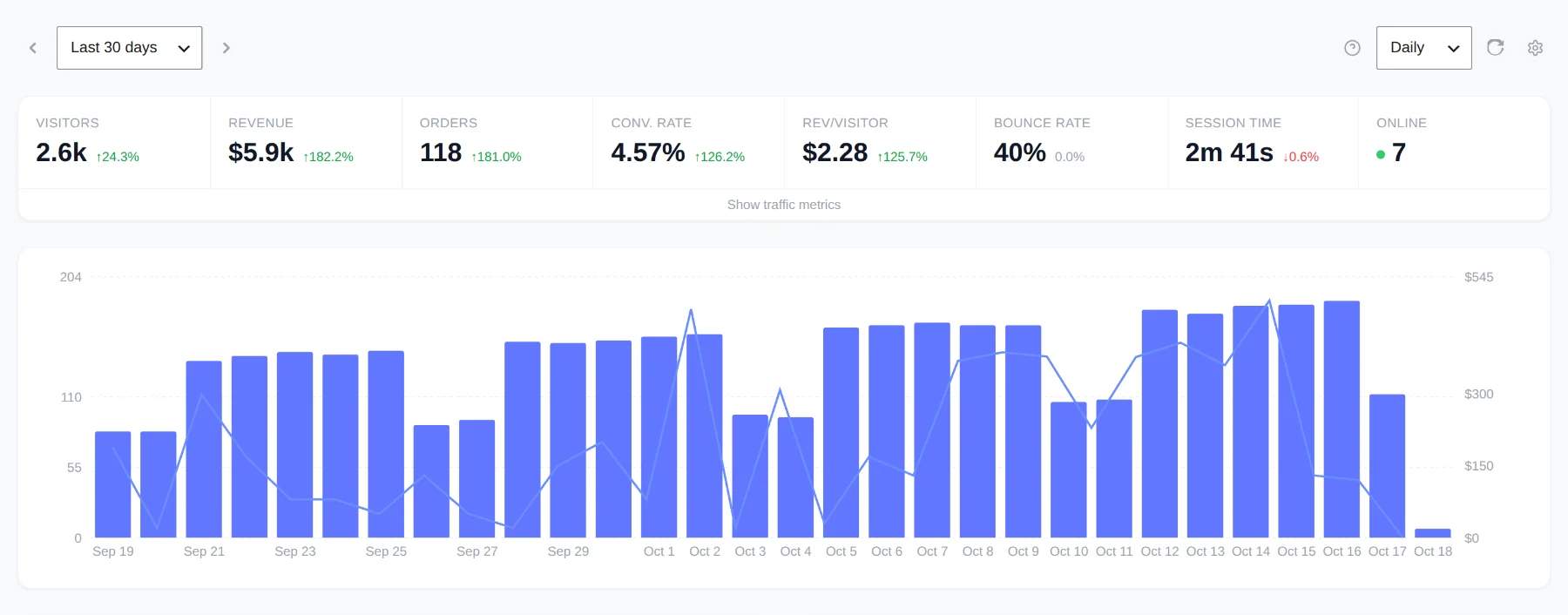
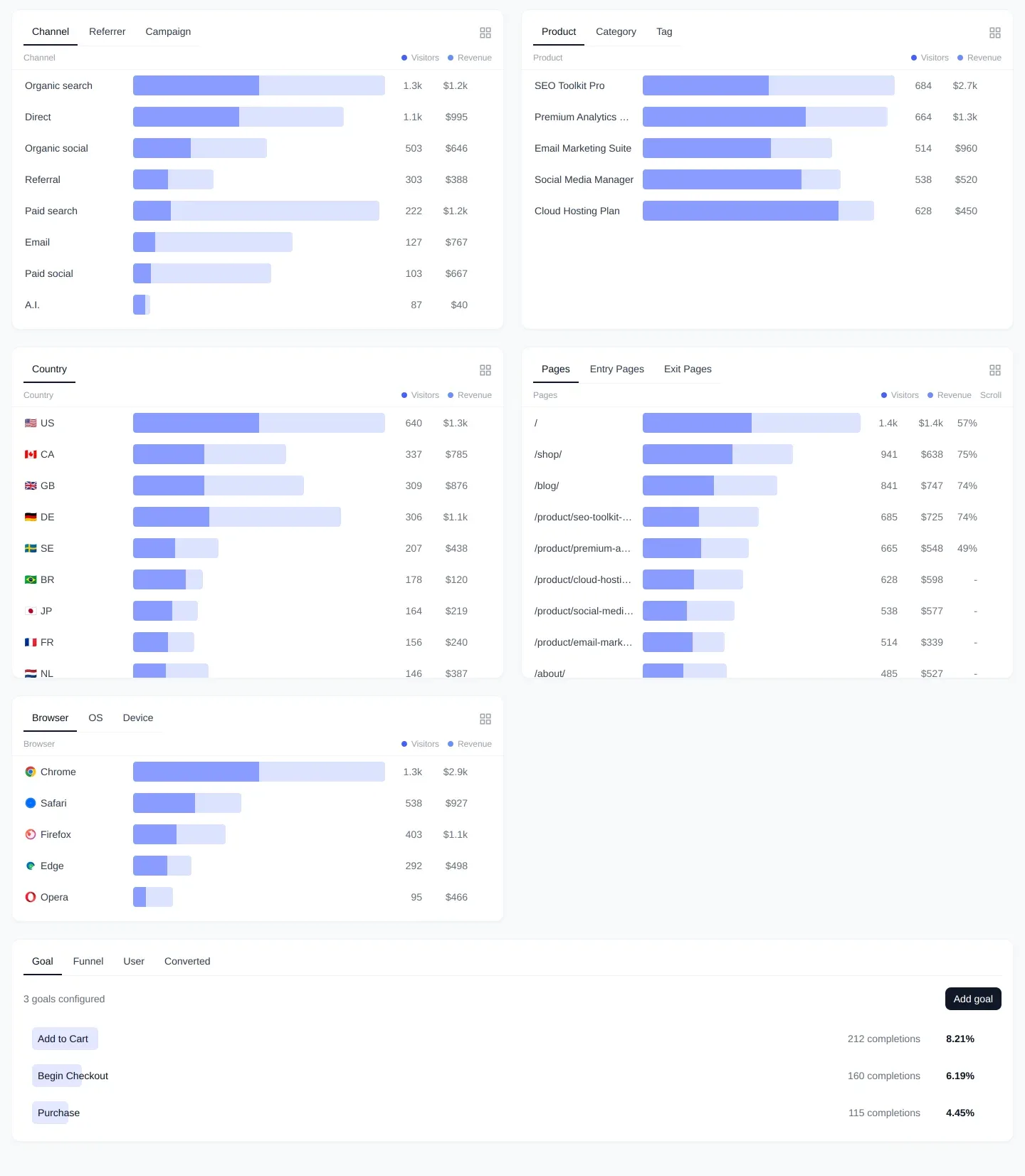
    No reports to configure and no properties to set up. Install the plugin, open the dashboard, and traffic, revenue, products, countries, pages, devices and conversions are already there.

    Last 30 days
    Daily
    Dashboard breakdowns: revenue per channel, product, country, page, browser and goal

    Real dashboard, demo store data. Hover the chart to see a day. Every number is a link to the detail behind it.

    Revenue per marketing channel: organic search, direct, paid search, paid social, email and referral

    Stop guessing which channel pays

    Revenue per channel, referrer and campaign

    Traffic is grouped into channels automatically: organic search, paid search, paid social, organic social, email, referral and direct. Next to each one you see how much money it made, not just how many people it sent.

    • Switch between Channel, Referrer and Campaign tabs on the same card.
    • Click any row to filter the entire dashboard by that source.
    • Compare with the previous period to spot channels that are growing or fading.
    • Orders without a tracked visit are shown honestly as Unattributed.
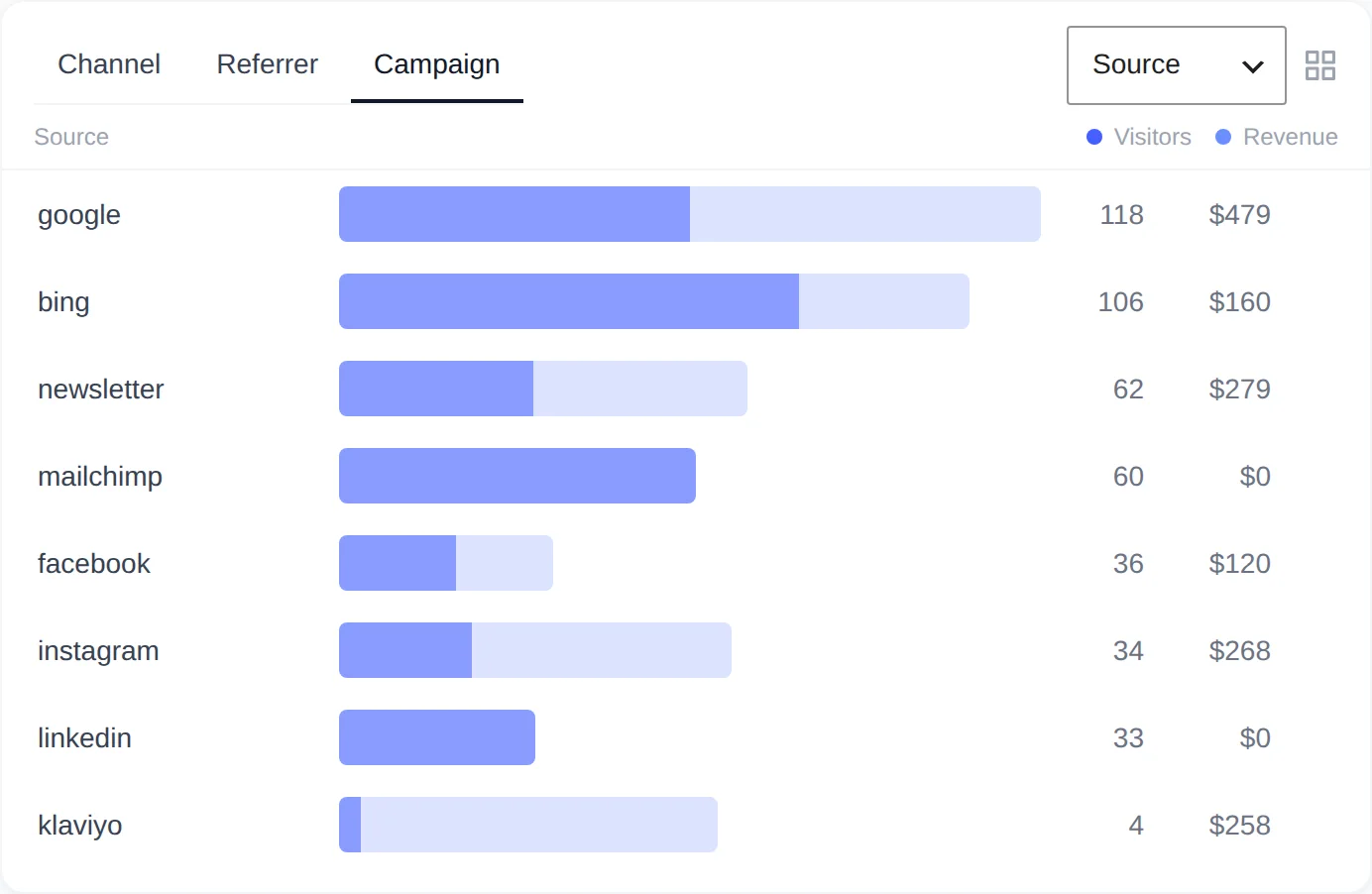
    UTM campaign breakdown with visitors and revenue per campaign

    Know what your ad spend returns

    WooCommerce UTM and campaign attribution

    Every utm_source, utm_medium and utm_campaign is recorded on the visitor's first visit. When that visitor orders, the revenue lands on the campaign, so you can finally put a dollar amount next to every ad set and newsletter.

    • First-touch attribution: the campaign that found the customer gets the credit.
    • Works with any ad platform, email tool or affiliate link that uses UTM tags.
    • Payment gateways that confirm later, like PayPal and Stripe webhooks, are attributed correctly.
    • Subscription renewals are not counted as new conversions.

    Find the leak in your checkout

    Funnels and goals

    WooCommerce cart and checkout events are tracked out of the box. Chain them into a funnel and the plugin shows how many shoppers you lose at each step. Define goals for anything else that matters: a pricing page visit, a form submission, a scroll to the reviews.

    1 funnel configured Add funnel
    Purchase Funnel3 steps
    Total Conversion Rate0.0%
    • Funnel steps can be events, page visits or both, in any order.
    • Track a button click by adding one attribute: data-rfa-goal="signup_click".
    • Custom events from JavaScript with window.rfa('event_name', { ... }).
    • E-commerce events are also pushed to the Google Tag Manager dataLayer.

    From first click to paid order

    Visitor timeline and converted customers

    The Converted tab lists every buyer with the channel and source that brought them. Open one and you get the complete path to purchase: the referrer, each page viewed, the cart events and the order, grouped by day and session.

    VisitorDetailChannelSourceValueDate

    Click a customer to open their timeline

    • See which pages your buyers read before they trust you with an order.
    • Country, device, browser and screen size for every customer.
    • Visitors who have not bought yet are listed too, so you can see what they are looking at.
    • Names and emails are stored only with consent or in Full tracking mode.
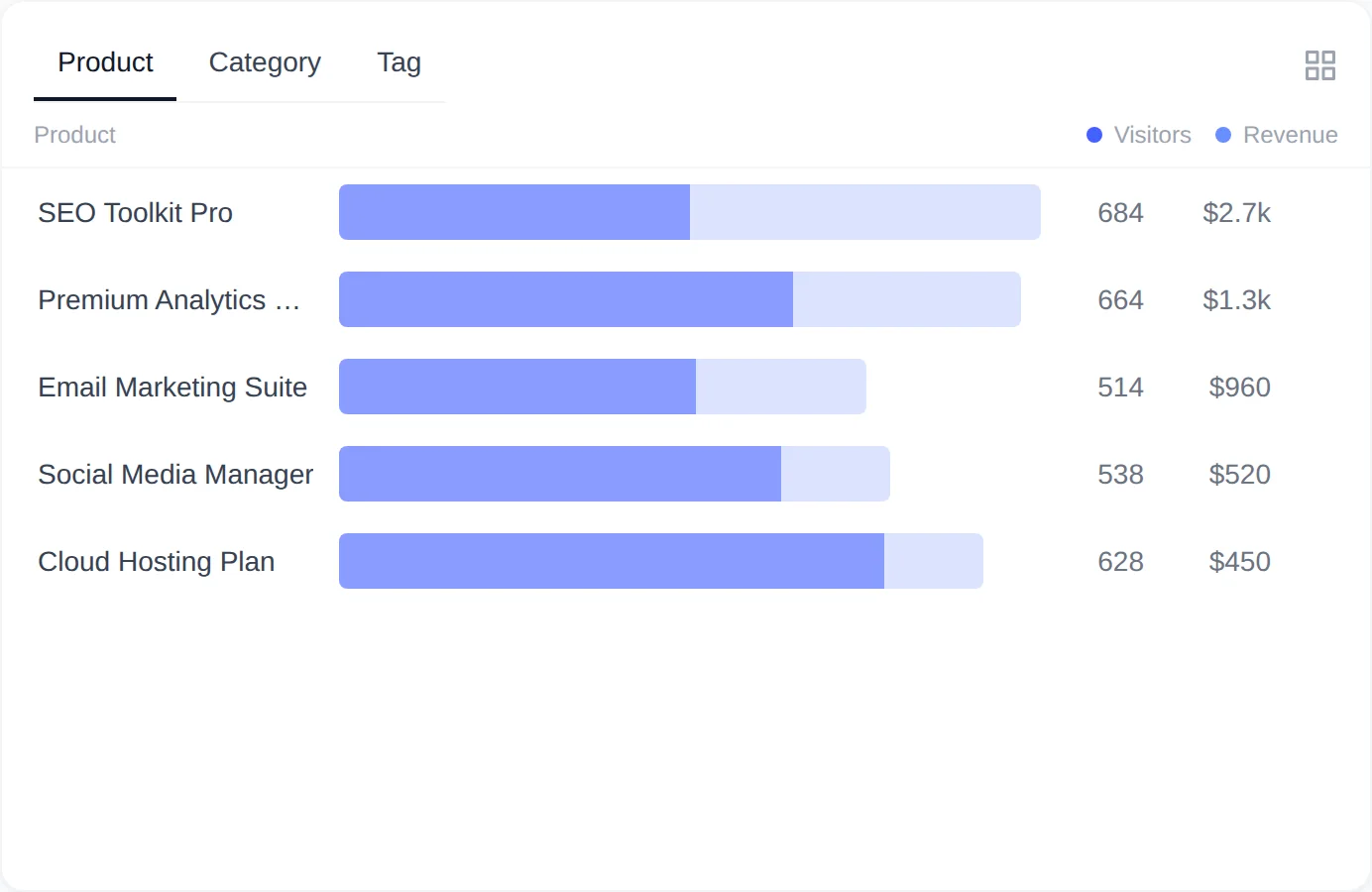
    Product breakdown with visitors and revenue per WooCommerce product

    Built for WooCommerce and EDD

    Product analytics: revenue per product, category and tag

    Product views and sales come straight from WooCommerce, so you can see which products get looked at and which ones actually sell, grouped by category and tag. Easy Digital Downloads stores get the same treatment.

    • Click a product to filter the whole dashboard down to its visitors, orders and conversion rate.
    • Refunds, partial refunds and cancelled orders are deducted automatically.
    • Pick the order status that counts as a sale, Completed by default.
    • Entry and exit pages tell you where shoppers land and where they leave.
    Privacy and GDPR settings with Privacy mode, Consent mode and Full tracking options

    GDPR without the headache

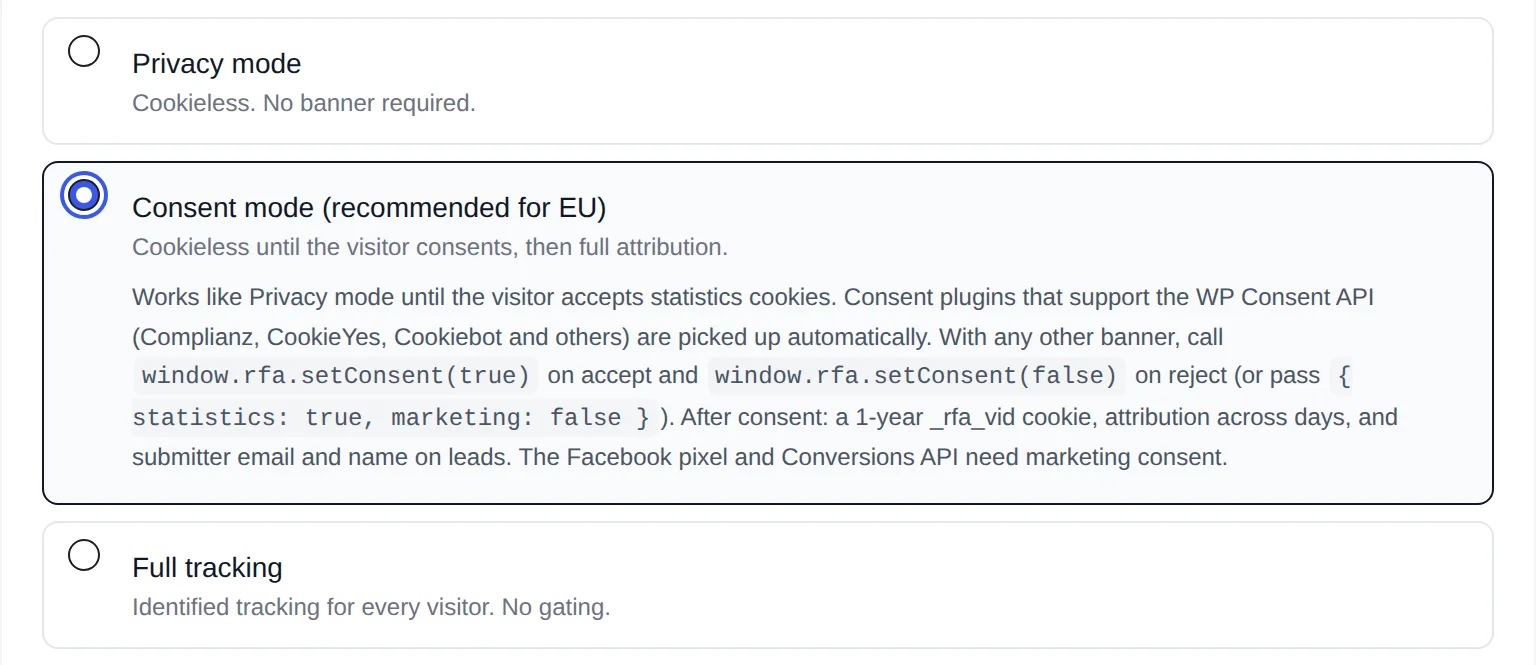
    Three privacy modes, you pick the trade-off

    Visitor IP addresses are never stored and nothing is sent to a third party. Privacy mode uses no cookies at all, like Plausible and Fathom. Consent mode stays cookieless until the visitor accepts statistics cookies, then adds attribution across days. Full tracking is for sites where consent is handled elsewhere.

    • Works automatically with Complianz, CookieYes, Cookiebot and any WP Consent API banner.
    • No fingerprinting, no cross-site tracking, no third-party cookies.
    • Export or erase everything linked to an email address in one click, and through WordPress's own privacy tools.
    • Data is kept 365 days by default and cleaned up automatically. You decide.

    Simple & lightweight

    How does Revenue First Analytics work?

    There is no account to create and no tracking ID to paste. The plugin runs entirely inside your WordPress install and detects your store and form plugins on its own.

    1

    Install and choose a privacy mode

    Upload the plugin, activate it and pick Privacy, Consent or Full tracking. A small async script starts collecting pageviews using sendBeacon, so nothing blocks your pages. Page caching is fine.

    2

    Orders and leads attach themselves

    WooCommerce and Easy Digital Downloads are detected automatically. At checkout the buyer's visit is saved on the order, and when the order reaches your chosen status the revenue is credited to the first visit's channel, campaign and landing page. Form submissions become leads the same way.

    3

    Open the dashboard, or just ask

    Everything lives under one admin menu. Optionally connect Google Search Console to see keywords next to organic revenue, enable the Facebook Conversions API, or install the MCP Adapter and ask Claude which campaign made the most money.

    Works with what you already run

    Detected automatically, nothing to configure.

    Shops

    WooCommerce Easy Digital Downloads WooCommerce Subscriptions

    Forms as leads

    Contact Form 7 WPForms Gravity Forms Fluent Forms Elementor Pro Forms Formidable Forms Ninja Forms Forminator Jetpack Forms Divi Bricks

    Consent

    Complianz CookieYes Cookiebot Any WP Consent API banner

    Optional

    Google Search Console Facebook Conversions API Google Tag Manager dataLayer MCP Adapter (Claude and other AI assistants)

    Like every one of our plugins, Revenue First Analytics is coded with best practices in mind. It is very light and will not slow down your website.

    There is no big setup. Install, activate, and your next order already shows up with its source. And with the money back guarantee, there is no reason not to try it out.

    Why not GA4 or Plausible?

    A Google Analytics alternative made for store owners

    Google Analytics can do almost anything if you have the time to set it up. Privacy-friendly tools are simple but stop at pageviews. Revenue First Analytics sits in between: simple, private, and about money.

    Revenue First Analytics Google Analytics 4 Plausible / Fathom
    Where your data lives Your WordPress database Google servers Vendor cloud (self-hosting possible)
    WooCommerce revenue per channel and campaign Out of the box Requires e-commerce tagging and reports Requires revenue goal setup
    Cookie banner Not needed in Privacy mode Required Not needed
    Purchase funnel for your shop Preconfigured Build it in Explorations Paid plan, manual setup
    Per-customer path to purchase Yes, with order details Limited No
    Form submissions as leads Automatic for 11 form plugins Manual events Manual events
    Ask an AI assistant about your sales Built in through MCP No No
    Cost One-time or yearly license Free, data shared with Google Monthly subscription

    Comparison reflects default setups as of October 2026. Other tools may offer similar features with additional configuration or plans.

    Simple Pricing

    Choose Your Licence

    Yearly Lifetime

    Billed annually until canceled. Cancel anytime from your account.

    1 Site

    Perfect for a single store

    $89 /year
    • All features included
    • 1 year of updates & support
    • 14-day money-back guarantee
    Buy Now
    100% Money Back Guarantee

    100% No-Risk Money Back Guarantee

    You are fully protected by our 100% Money Back Guarantee. If you are not completely satisfied within 14 days of purchase, we will happily issue a full refund -- no questions asked, no hoops to jump through.

    Current version: 1.4.0 | Last updated: October 2026 | Requires WordPress 6.0+, works with WooCommerce 7.0+ and Easy Digital Downloads

    Frequently Asked Questions

    Can't find the answer you're looking for? Reach out to our customer support team.

    Do I need WooCommerce to use it?
    No. Without a shop it works as a privacy-first WordPress analytics plugin with goals, funnels and form submissions as leads. With WooCommerce or Easy Digital Downloads active, revenue attribution switches on automatically.
    Do I need a cookie banner?
    Not in Privacy mode: nothing is stored on the visitor's device and no personal data is kept, the same approach as Plausible and Fathom. Consent mode stores nothing until the visitor consents, so it works with your existing banner. Full tracking sets a cookie for everyone and needs consent where the law requires it. This is not legal advice; check with your own advisor.
    How is this different from WooCommerce's built-in Analytics?
    WooCommerce Analytics reports what sold: revenue, orders, products and coupons. It has no visitor data, so it cannot show conversion rates, which channels and campaigns brought the revenue, or where shoppers drop off before checkout. WooCommerce order attribution shows the source on each individual order, but not as reports. Revenue First Analytics adds the traffic side and ties every order to the visit that brought it, so you see revenue per channel, campaign, landing page and product in one dashboard.
    How are sales attributed?
    When the buyer places the order, the plugin saves their visitor and session on the order. When the order reaches the status you choose in Settings (Completed by default), the revenue is recorded against the buyer's first visit: its channel, referrer, campaign and landing page. Gateways that confirm later by webhook, such as PayPal and Stripe, are attributed correctly because the visit was captured at checkout. Orders without a tracked visit are shown as Unattributed, and subscription renewals are not counted as new conversions.
    Is it a good Google Analytics alternative for WooCommerce?
    Yes, for most store owners. Traffic, sources, campaigns, pages, countries, devices, revenue, products, funnels and goals are all there. If you rely on GA4-specific features such as Google Ads audience sync or BigQuery exports, you can keep GA4 running alongside; the two do not interfere.
    How do I connect my cookie banner?
    If your consent plugin supports the WP Consent API (Complianz, CookieYes, Cookiebot and others) there is nothing to do. For any other banner, call window.rfa.setConsent(true) when the visitor accepts and window.rfa.setConsent(false) when they decline, or pass an object with statistics and marketing flags.
    How do I track a button click or a custom event?
    Add data-rfa-goal="signup_click" to any element and every click sends an event with that name, ready to use as a goal or a funnel step. Use data-rfa-scroll-goal to fire when an element scrolls into view, or call window.rfa('event_name', { key: 'value' }) from JavaScript.
    Can I ask Claude or another AI assistant about my analytics?
    Yes. The plugin registers read-only abilities for the WordPress Abilities API (WordPress 6.9+): overview, traffic and revenue breakdowns, trends, product performance, funnels, goals, paths to conversion and visitors online now. Install the official MCP Adapter plugin and connect your client with an administrator application password. The abilities return aggregated reports only, never customer names, emails or visitor IDs.
    Does it slow down my site or break with caching?
    No. The tracking script is small, loads async and sends data with navigator.sendBeacon without blocking the page. It posts to a REST endpoint that is never cached, and the WooCommerce and EDD hooks run on checkout requests, which are not cached either.
    How long is data kept, and how do I handle GDPR requests?
    365 days by default, adjustable in Settings; older visits, pageviews and events are deleted daily. Access and erasure requests are handled with WordPress's own Tools, Export Personal Data and Erase Personal Data, and the Settings page has a Data Subject Requests panel to export or delete everything linked to an email address.
    Do you offer refunds?
    Absolutely! We provide a 14-day money-back guarantee for any reason. If you discover that the plugin doesn't meet your requirements, simply get in touch with us, and we'll promptly process a refund for you.
    Still have questions? Contact our support team

    Ready to see where your revenue really comes from?

    Self-hosted, privacy-first WooCommerce analytics with revenue on every report. 14-day money-back guarantee, no questions asked.

    $329 one-time
    Buy Now

    Select Plan

    1 Site Perfect for a single store
    $89
    Lifetime Pay once, updates forever
    $179
    Most Popular
    Unlimited Sites Pay once, updates forever
    $329